Taming Unit Test logging in Docker pipeline for .NET



Automated unit tests are the backbone of the testing pyramid. Unit tests enable us to solve bugs using a test driven development strategy. They express both intent and usage and will become more valuable by time.
Last week I changed the way we integrated unit tests in our CI/CD pipeline. Here’s our situation:
- All projects are written in C# / .Net Core.
- Every project has a matching unit test project.
- Unit tests are written in Xunit.
- Asserts are expressed as Fluent Assertions.
- The CI script runs in a
microsoft/aspnetcore-build:2.0.0Docker container. - Unit tests are part of the script: restore, build, test, publish, pack, persist.
Logging practices
The main problem of a CI/CD pipeline — in my opinion — is logging. When it logs too little you don’t know what’s going on, when it logs too much you can’t see the trees to the forest. That’s why I adhere to the following principles:
- Only. Show. Relevant. Information.
- Divide the pipeline into clear steps with output like “Step 4/9: Testing”.
- Restore and build once. This speeds up the process and prevents extra logging.
- Always show errors.
- Terminate on failure with a clear reason.
The problem: too much output
Let’s view the output of a typical unit test project (xunit) that ran by
dotnet test -no-build -norestore:
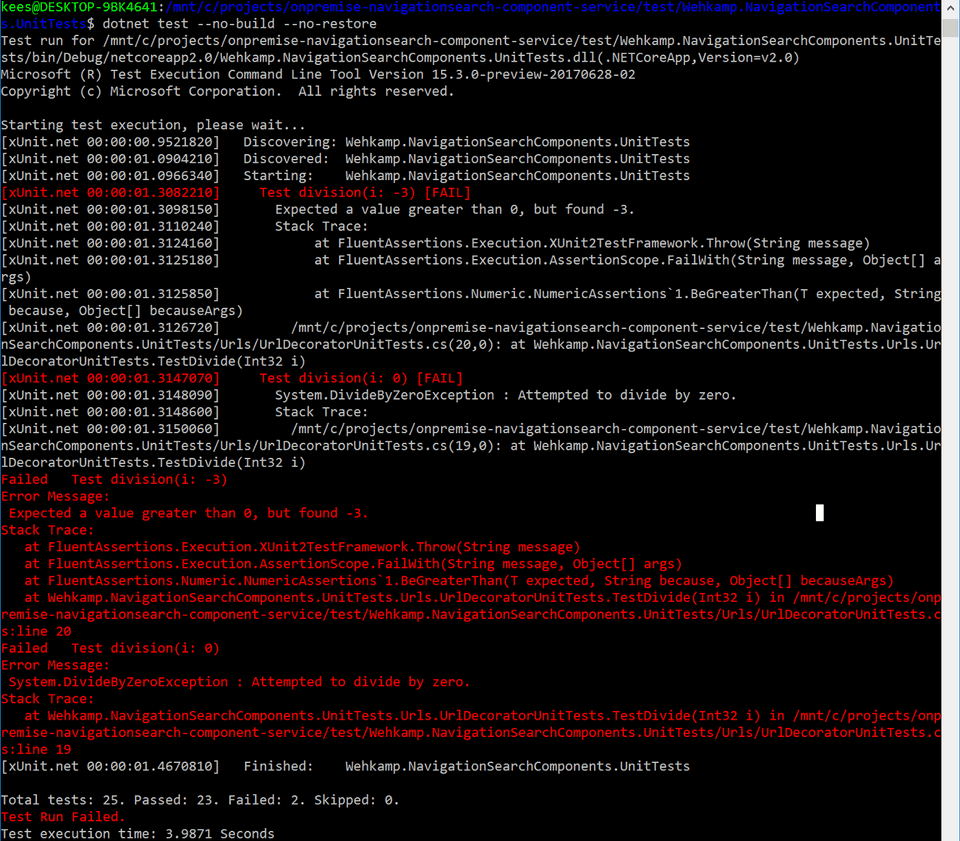
Now imagine if you have 9 of these projects. Imagine you don’t have color-coded logs.
Get to greps with output
What can be done to reduce the output of the unit tests? A couple of things:
- Don’t show the error stream, the standard stream has enough information.
- Show lines that start with
Failed, because they contains the name of the failed test. - Show lines that start with
Total, because they contains a summary of all the tests. - Show lines that contain the word
Expect, because they contain the reason the unit test is failing. - Show lines that contain the word
Exception, because they contain exception information. - Discard all other lines.
Let’s use grep with a regular expression to parse the output of the test: dotnet test –no-build –no-restore 2> /dev/null | grep -Po ‘^(Failed|Total|\s+Expect|[^:]+Exception).*$’ –color=never
This will produce the following information:

Note that the information is both compact and relevant.
CI/CD implementation
Let’s take a look at the CI/CD implementation. In most pipelines a restore and build is done before the test is started. To speed things up, I like to test the release binaries that were generated by the previous steps. Just add -c Release to the test runner command. I also want to output the name of the project before testing it. And I like to have a summary at the end of the test step.
Let’s examine the bash script:
echo -n > test.txtfor project in \`find ./ -wholename "\*UnitTests\*.csproj"\`; doecho "Testing $(basename $project)"dotnet test $project --no-build --no-restore -c Release 2> /dev/null |
    grep -Po '^(Failed|Total|\\s+Expect|\[^:\]+Exception).\*$' --color=never |
    tee -a test.txt

    echo ""donecat test.txt | grep -oP '(?<=Total tests: )\\d+' | awk '{ sum += $1 } END { print "Total tests: "sum }'
cat test.txt | grep -oP      '(?<=Passed: )\\d+' | awk '{ sum += $1 } END { print "Passed:      "sum }'
cat test.txt | grep -oP      '(?<=Failed: )\\d+' | awk '{ sum += $1 } END { print "Failed:      "sum }'
cat test.txt | grep -oP     '(?<=Skipped: )\\d+' | awk '{ sum += $1 } END { print "Skipped:     "sum }'echo ""TESTFAILED=$(cat test.txt | grep -oP '(?<=Failed: )\\d+' | awk '{ sum += $1 } END { print sum }')
rm test.txtif \[\[ $TESTFAILED -ne 0 \]\] ; then
    echo "Unit test(s) failed."
    exit 1
fi
Commands like tee, cat, grep and awk are part of any Linux installation. When the script runs it looks way better:
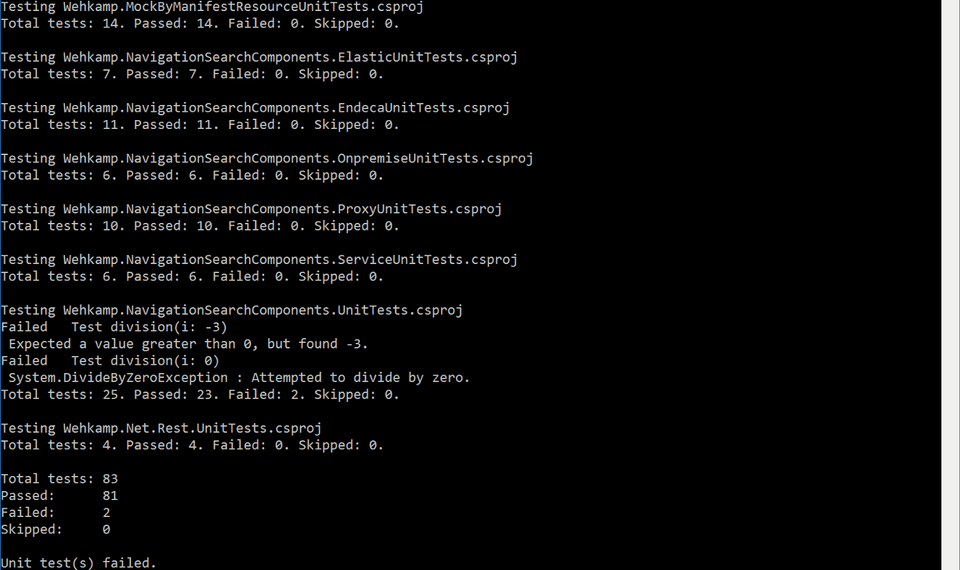
So there you have it. Turn off the noise; be more effective.
Note: the screenshots are taken from bash on Windows. I don’t use Linux to develop, only to do CI/CD. Installing bash on Windows will help to debug your CI/CD scripts.
Originally published at keestalkstech.com on November 26, 2017.


