Streaming a Kafka topic in a Delta table on S3 using Spark Structured Streaming



At Wehkamp we use Apache Kafka in our event driven service architecture. It handles high loads of messages really well. We use Apache Spark to run analysis and machine learning.
When I work with Kafka, the words of Mark van Gool, one of our data architects, always echo in my head: “Kafka should not be used as a data store!” It is really tempting for me to do so, but most of the event topics have a small retention period. Our data strategy specifies that we should store data on S3 for further processing. Raw S3 data is not the best way of dealing with data on Spark, though. In this blog I’ll show how you can use Spark Structured Streaming to write JSON records on a Kafka topic into a Delta table.
Note: This article assumes that you’re dealing with a JSON topic without a schema. It also assumes that the buckets are mounted to the file system, so we can read and write to them directly (without the need for boto3). Also: I’m using Databricks, so some parts are Databricks-specific.
Design
To make things easier to understand, I’ve made a diagram of the setup we’re trying to create. Let’s assume we have 2 topics that we need to turn into Delta tables. We have another notebook that consumes those delta tables.
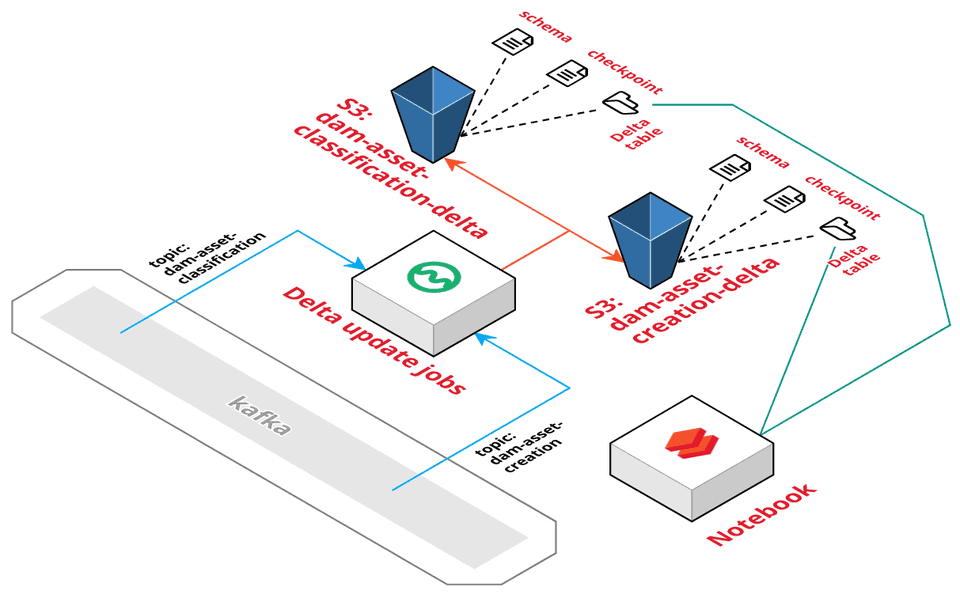
Each topic will get its own Delta table in its own bucket. The topics are read by parametrised jobs that will use Spark Structured Streaming to stream updates into the table. The update jobs can run every hour or continuously, depending on your needs. The job will save the Kafka group id, so it will read every message only once.
The notebook that needs the topics, connects to the delta table and consumes the data. This way the notebook becomes decoupled from Kafka.
Steps
We need to do the following steps:
- Add some widgets to parametrise the notebook.
- Infer the Kafka schema of the topic and persist it for later use.
- Create a schema from the schema file.
- Read a stream with the schema from Kafka.
- Write a delta-table using an upsert.
Let’s start!
1. Configuration
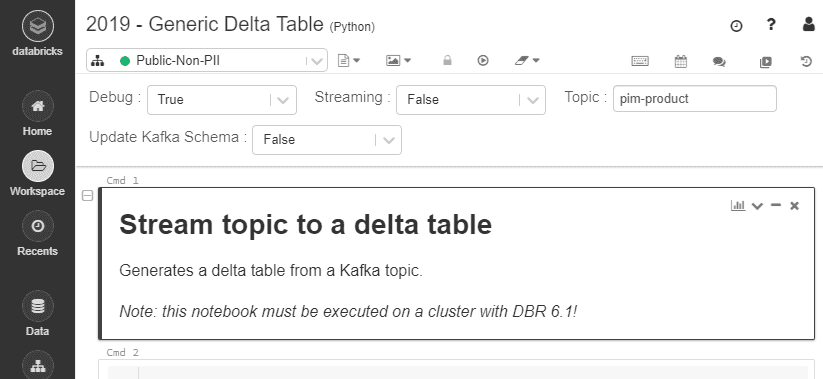
We will build a generic notebook, so we must add some widgets to influence the way it runs:
- Let’s add a debug widget to support debug runs that don’t touch production file.
- We’ll use the streaming setting to indicate if we want to use continues streaming or only trigger it once (
False). Most of our jobs are only scheduled once every hour. - The topic holds the Kafka topic we want to turn into a delta table.
- The update Kafka schema indicates that we want to re-infer the Kafka schema. We need this if the structure of the topic changes.
The widgets look like this:
Global variables
Let’s start out with a cell with global variables that will not be parametrised.
kafka_broker = "my.kafka.queue:9092"
bucket_prefix = "my-company-bucket-prefix-"
At Wehkamp we use prefixes for buckets.
Widgets
Let’s set up the widgets:
true_false = ["True", "False"]

dbutils.widgets.removeAll()
dbutils.widgets.text("topic", "", "Topic")
dbutils.widgets.dropdown("debug", "True", true_false, "Debug")
dbutils.widgets.dropdown("streaming", "False", true_false, "Streaming")
dbutils.widgets.dropdown("update_kafka_schema", "False", true_false, "Update Kafka Schema")
Parse widgets
Now that we have our widgets, we should parse it to variables. I’ve lifted some code from this blog to help me get the values from the widgets:
def str_to_bool(value):
  FALSE_VALUES = ['false', 'no', '0']
  TRUE_VALUES = ['true', 'yes', '1']
  lvalue = str(value).lower()
  if lvalue in (FALSE_VALUES): return False
  if lvalue in (TRUE_VALUES):  return True
  raise Exception("String value should be one of {}, but got '{}'.".format(
    FALSE_VALUES + TRUE_VALUES, value))


def validate_required_argument_and_return_value(name):
  value = getArgument(name)
  if len(value) < 1:
    dbutils.notebook.exit("'{}' argument value is required.".format(name))
  return value
We will convert the widgets values to variables:
debug = str_to_bool(getArgument("debug"))
topic = validate_required_argument_and_return_value("topic")
streaming = str_to_bool(getArgument("streaming"))
update_kafka_schema = str_to_bool(getArgument("update_kafka_schema"))
Locations by convention
To write the Delta table, we need 3 settings: the location of the delta table, the location of the checkpoints and the location of the schema file. We will use a convention to get these locations, based on the name of the topic:
bucket = "/mnt/{}{}-delta".format(bucket_prefix, topic)

delta_location = bucket + "/delta-table"
checkpoint_location = bucket + "/checkpoints";
schema_location = bucket + "/kafka_schema.json";

if debug:
  delta_location += "_debug"
  checkpoint_location += "_debug"
  schema_location += "_debug.json"

print("Debug:               ", debug)
print("Streaming:           ", streaming)
print("Update Kafka Schema: ", update_kafka_schema)
print("Broker:              ", kafka_broker)
print("Topic:               ", topic)
print("Delta:               ", delta_location)
print("Checkpoint:          ", checkpoint_location)
print("Schema: ", schema_location)2. Schema
The Kafka topic contains JSON. To properly read this data into Spark, we must provide a schema. To make things faster, we’ll infer the schema only once and save it to an S3 location. Upon future runs we’ll reuse the schema.
Schema inference
Before we can read the Kafka topic in a streaming way, we must infer the schema. We’re using code from this blog to infer the schema. Let’s start off with some imports:
import json, os, re

from delta.tables import *

from pyspark.sql.functions import *
from pyspark.sql.types import *
from pyspark.sql import *
Now let’s define a method to infer the schema of a Kafka topic and return it in the JSON format:
def infer_topic_schema_json(topic):

    df_json = (spark.read
               .format("kafka")
               .option("kafka.bootstrap.servers", kafka_broker)
               .option("subscribe", topic)
               .option("startingOffsets", "earliest")
               .option("endingOffsets", "latest")
               .option("failOnDataLoss", "false")
               .load()
               # filter out empty values
               .withColumn("value", expr("string(value)"))
               .filter(col("value").isNotNull())
               # get latest version of each record
               .select("key", expr("struct(offset, value) r"))
               .groupBy("key").agg(expr("max(r) r"))
               .select("r.value"))

    # decode the json values
    df_read = spark.read.json(
      df_json.rdd.map(lambda x: x.value), multiLine=True)

    # drop corrupt records
    if "_corrupt_record" in df_read.columns:
        df_read = (df_read
                   .filter(col("_corrupt_record").isNotNull())
                   .drop("_corrupt_record"))

    return df_read.schema.json()
Inferring a schema might take a while, as Spark has to read the entire topic to determine the schema. That’s why we should cache it in the S3 bucket, so we only have to infer the schema once.
infer_schema = update_kafka_schema

if not infer_schema:
  try:
      topic_schema_txt = dbutils.fs.head(schema_location)
  except:
    infer_schema = True
    pass

if infer_schema:
  topic_schema_txt = infer_topic_schema_json(topic)

  dbutils.fs.rm(schema_location)
  dbutils.fs.put(schema_location, topic_schema_txt)
Note: I’m using **_dbutils.fs_** because writing a file with **_file.write_** will write the file to the driver, but not to S3.
Load schema
Loading the JSON from S3 into a schema is super simple:
topic_schema = StructType.fromJson(json.loads(topic_schema_txt))
print(topic_schema)3. Read Kafka Stream
Now we can finally start to use Spark Structured Streaming to read the Kafka topic. The function we’ll use looks a lot like the infer_topic_schema_json function. The main difference is the usage of readStream that will use structured streaming.
def read_stream_kafka_topic(topic, schema):
    return (spark.readStream
            .format("kafka")
            .option("kafka.bootstrap.servers", kafka_broker)
            .option("subscribe", topic)
            .option("startingOffsets", "earliest")
            .option("failOnDataLoss", "false")
            .load()
            # filter out empty values
            .withColumn("value", expr("string(value)"))
            .filter(col("value").isNotNull())
            .select(
              # offset must be the first field, due to aggregation
              expr("offset as kafka_offset"),
              expr("timestamp as kafka_ts"),
              expr("string(key) as kafka_key"),
              "value"
            )
            # get latest version of each record
            .select("kafka_key", expr("struct(*) as r"))
            .groupBy("kafka_key")
            .agg(expr("max(r) r"))
            # convert to JSON with schema
            .withColumn('value',
                        from_json(col("r.value"), topic_schema))
            .select('r.kafka_key',
                    'r.kafka_offset',
                    'r.kafka_ts',
                    'value.*'
            ))
We can read our topic into a dataframe:
df = read_stream_kafka_topic(topic, topic_schema)
4. Delta table
Now that we have a (streaming) dataframe of our Kafka topic, we need to write that dataframe to a Delta table.
Ensure the Delta table
First, we need to make sure the Delta table is present. Here is where we can use the schema of the dataframe to make an empty dataframe. This dataframe can create an empty Delta table if it does not exist.
(spark
 .createDataFrame([], df.schema)
 .write
 .option("mergeSchema", "true")
 .format("delta")
 .mode("append")
 .save(delta_location))
Clean up
You would not expect a clean up step here — but remember that this code is executed every time we run the script. Because we are using streaming we do not know when the update is finished. That’s why we prefer to clean the delta table before we start the streaming process.
First we optimize the delta table. We use the default bin-packing to produce evenly-balanced data files with respect to their size on disk.
sql = "OPTIMIZE delta.`{}`".format(delta_location)
spark.sql(sql)
None
Next, we’ll vacuum to throw away data that is older than 7 days. You might not want this in your specific use case, but we say delta tables growing way too big because we did not vacuum.
sql = "VACUUM delta.`{}`".format(delta_location)
spark.sql(sql)
None
You might want to read up on the Delta Time Travel feature.
Upsert by Kafka key
The kafka_key is a unique identifier for each record. We can use the key to update the data in the Delta table. We'll use this script to make that upsert happen:
def upsertToDelta(df, batch_id):
  (DeltaTable
   .forPath(spark, delta_location)
   .alias("t")
   .merge(df.alias("s"), "s.kafka_key = t.kafka_key")
   .whenMatchedUpdateAll()
   .whenNotMatchedInsertAll()
   .execute())
We want to update or insert all the columns of our dataframe into the Delta table, so we are using **whenNotMatchedInsertAll** and **whenMatchedUpdateAll**. More info can be found in the documentation of the DeltaMergeBuilder.
Write stream data
Now that we have everything in place, we can write to our delta table:
w = df.writeStream;

if not streaming:
  w = w.trigger(once=True)

(w.format("delta")
 .option("checkpointLocation", checkpoint_location)
 .foreachBatch(upsertToDelta)
 .outputMode("update")
.start(delta_location))5. Reading a Delta table
Reading a Delta table is a piece of pie:
df_delta = (spark.read
            .format("delta")
            .load("/mnt/{prefix}-{topic}-delta/delta-table"))
Final thoughts
I’ve shown one way of using Spark Structured Streaming to update a Delta table on S3. The combination of Databricks, S3 and Kafka makes for a high performance setup. But the real advantage is not in just serializing topics into the Delta Lake, but combining sources to create new Delta tables that are updated on the fly and provide relevant data to your domain.
We’ve seen an uplift in the performance of scripts that used to query Kafka themselves (some had an uplift of 25%). A delta table is faster and makes code easier to read.
A big shout-out to Jesse Bouwman (Data Scientist) and Martinus Slomp (Senior .NET Developer) for the collaboration on this code.
Further reading
While working on this topic I found some excellent sources for reading:
- Introduction to Delta Lake: Delta Lake Quickstart
- Delta Lake: Table Deletes, Updates, and Merges
- The Delta Lake Project Turns to Linux Foundation to Become the Open Standard for Data Lakes
- Simple, Reliable Upserts and Deletes on Delta Lake Tables using Python APIs
- Easy Spark optimization for max record: aggregate instead of join?
- Add more color to the Python code of your Databricks notebook
I work as a Lead Developer at Wehkamp.nl, one of the biggest e-commerce companies of the Netherlands. This article is part of our Tech Blog, check it out & subscribe. Looking for a great job? Check our job offers or drop me a line on LinkedIn.
Originally published at https://keestalkstech.com on November 9, 2019.


